Import rule
The visible rule increases quantity when the existing card is compatible.
 Scott's TCG Binder
Import and export tools provide a structured way to bring supported collection information into Scott’s TCG Binder or take supported information out for other workflows. Import uses a file and, in the captured app, increases quantity when an existing card is compatible. Export Collection writes JSON or CSV. Shareable lists export the trade list, the sale list, or the wishlist. Personal card photos are not part of these list exports. Backup & Restore is the separate path that can include personal images.
Mac
shot desktop-import-export · seq 20 · assets/screenshots/original/desktop/0020.png
iPhone
shot iphone-import-export · seq 126 · assets/screenshots/original/iphone/import-export.png
Additional platform screenshots will be added as this guide is expanded.
The visible rule increases quantity when the existing card is compatible.
Trade, sale, and wishlist are separate exports. There is no separate trade-workbench screen in this capture.
Import Collection uses Choose File. When this card already exists offers Increase Quantity When Compatible in the capture. Export Collection offers Export JSON and Export CSV. Export Shareable Lists offers Share Trade List, Share Sale List, and Export Wishlist.
Mac
shot desktop-import-export · seq 20 · assets/screenshots/original/desktop/0020.png
iPhone
shot iphone-import-export · seq 126 · assets/screenshots/original/iphone/import-export.png
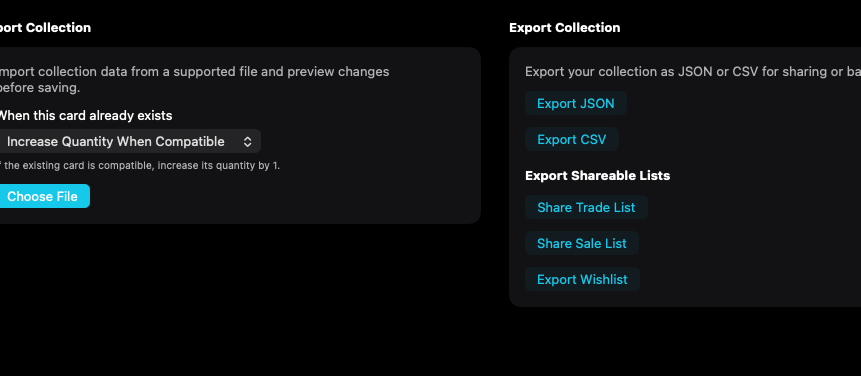
Import, full export, and shareable lists are separate actions.
Mac, iPhone, and iPad share the same collection model. Each platform presents those records in a layout that fits its screen.
The captured iPhone screen is export only. The Mac import panel is not on this screen.
Operational steps, controls, and the annotated screen.