Coverage
The status line reports priced and missing counts for the collection and the catalog, plus failed and unavailable counts.
 Scott's TCG Binder
Pricing connects available market-price information to the cards you own. See estimated card values, understand how quantity contributes to collection value, identify cards without current pricing, and use Analytics to understand how available pricing changes over time.
Mac
shot desktop-pricing · seq 19 · assets/screenshots/original/desktop/0019.png
iPhone
shot iphone-pricing · seq 125 · assets/screenshots/original/iphone/pricing.png
Additional platform screenshots will be added as this guide is expanded.
The status line reports priced and missing counts for the collection and the catalog, plus failed and unavailable counts.
Preferred currency, market, automatic refresh, and optional eBay and PriceCharting credentials live in Settings → Pricing.
Search cards, then filter Status, Set, Series, and Foil. Priced, Missing, and All switch the table. Columns are Card, Set, Foil, Quantity, Market Price, Total Value, Status, and Action. Refresh Missing Prices and Price Build are in the header. The capture shows a catalog value and a last-updated time.
Mac
shot desktop-pricing · seq 19 · assets/screenshots/original/desktop/0019.png
iPhone
shot iphone-pricing · seq 125 · assets/screenshots/original/iphone/pricing.png

Switch between priced cards and cards that have no current pricing.
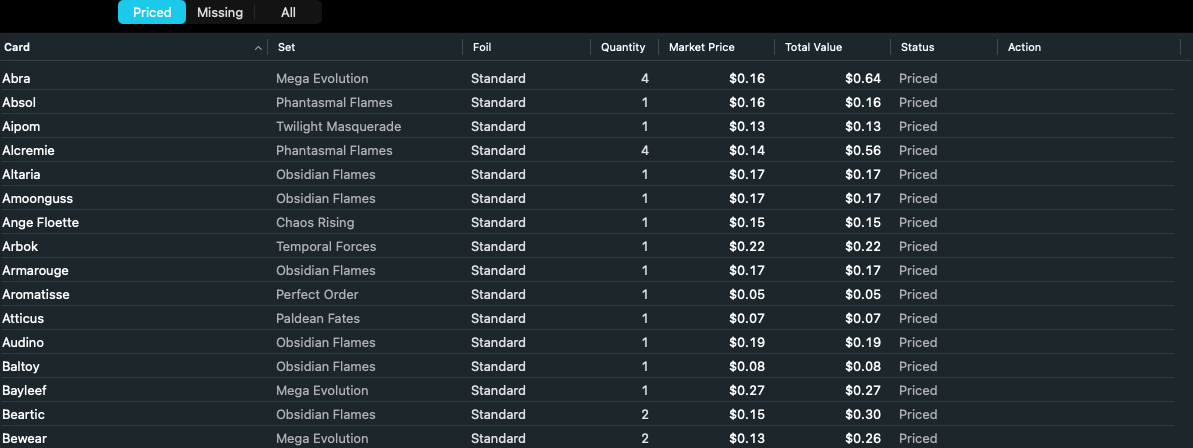
Market price and quantity produce the estimated total for the copies you own.
Mac, iPhone, and iPad share the same collection model. Each platform presents those records in a layout that fits its screen.
Priced, Missing, and All stay a segmented control. The list replaces the wide table.
Operational steps, controls, and the annotated screen.